


Key Takeaways
- KDB-X MCP server enables seamless interaction between natural language queries and both structured and unstructured data.
- It enhances the traditional LLM interface by providing access to domain-specific tools implemented as custom Python functions.
- It is built on a foundation of modularity, discoverability, and ease of extension. Tools and prompts are auto-detected at launch, and templates enable developers to build in minutes.
- Real-world use cases, such as an Equity Research Assistant, turns simple prompts into structured analysis to accelerate actionable financial intelligence.
Large Language Models (LLMs) have rapidly established themselves as powerful tools for natural language tasks, summarizing reports, surfacing patterns, and enabling intuitive human–machine interaction. Yet, in financial services, where the core of decision-making is not language but high-volume, high-frequency, highly structured data, they can often fall short.
This creates a fundamental challenge. A misplaced calculation or a delayed signal can erode trust and result in significant loss. Without a reliable way to integrate structured data, LLMs in financial services risk remaining experimental rather than becoming production-grade tools.
In this blog, we will discuss how KDB-X MCP server addresses this challenge directly, enabling natural language queries to seamlessly interact with both structured and unstructured data, without compromising speed or accuracy.
What is an MCP server?
The KDB-X Model Control Protocol (MCP) server extends the traditional LLM interface by providing access to registered, domain-specific tools. These tools are implemented as custom Python functions that extend model capabilities with specialized tasks such as computing volatility, querying market data, or semantically searching SEC filings within KDB-X tables.
Using tools such as Claude, developers can connect to the KDB-X MCP server through a lightweight integration. Once running, prompts that require structured analysis, such as “Show Apple’s 20-day SMA between January and March” or “Search Tesla’s 10-K filings for business risks”, are automatically routed to the appropriate tool. This ensures output combines the fluency of LLMs with the precision of structured analytics, resulting in genuine financial and operational depth.
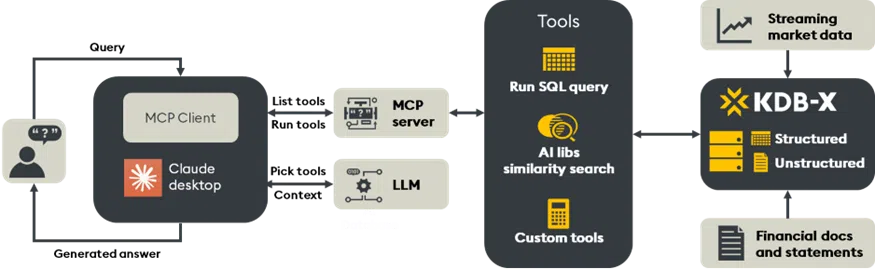
The KDB-X MCP server is built on a foundation of modularity, discoverability, and extensibility:
- Each tool or prompt resides in its own file and registers automatically at startup.
- Tools and prompts are auto-detected at launch without manual configuration.
- Templates enable developers to build new tools in minutes.
- Plain-language prompts transform into actionable outputs, tables, charts, and document-linked summaries, delivered with full traceability, contextual grounding, and enterprise-grade control.
Architecture and extensibility
The KDB-X MCP Server is designed with developers in mind, but its impact extends to the business user, delivering actionable insights with speed, accuracy, and traceability.
From query to insight
When a user submits a query, such as “What was Apple’s 20-day moving average in Q1?”, the LLM recognizes that the request maps to a registered MCP tool. The prompt is routed to the appropriate MCP Server, which executes the corresponding Python function and returns a structured response. This is made possible by a live registry of tools and prompts, which functions as an API layer between the LLM and domain-specific logic. From the LLM’s perspective, the tools behave like a callable extension, invoked dynamically whenever structured analysis is required.
Dynamic discovery of modules
KDB-X MCP offers a true plug-and-play module system. Any Python file placed in the tools/ or prompts/ directory is automatically discovered and registered at startup, without manual imports or configuration. For example, to create a new tool for querying customer orders, summarizing incident logs, or forecasting downtime, developers simply drop a Python script into the folder and restart the server.
Each file defines its functionality through a register_tools() or register_prompts() function, ensuring clarity in how tools are exposed and invoked.
Configurable integration with KDB-X
Connections to KDB-X are fully configurable, using environment variables or .env files for simplicity and security. The MCP Server leverages modern Python standards (Pydantic + BaseSettings) to define settings, including database endpoints, ports, API keys, reranking options, and embedding models.
This approach allows teams to:
- Seamlessly switch between development, staging, and production databases.
- Integrate custom embedding models or rerankers.
- Securely manage credentials via .env files or Docker secrets.
- Whether running locally with Docker or deploying to the cloud, configuration remains explicit, portable, and secure.
Deployment and setup
The KDB-X MCP server supports macOS, Linux, and Windows (via WSL), with simple, copy-paste setup guides for each platform. For detailed instructions, please refer to the KDB-X MCP readme.
Once configured, launching a tool such as Claude Desktop will display the KDB-X MCP Server as an available MCP integration. Tools are automatically discovered and can be called directly within the Claude chat interface, either via a dropdown menu or a query.
The KDB-X MCP Server equips developers with two core tools: KDB-X run SQL query and KDB-X sim search. A developer template is also included, making it simple to extend the platform with custom functionality.
KDB-X run SQL query
The KDB-X run SQL query executes raw SQL SELECT queries over structured kdb datasets. It includes support for filtering (WHERE), aggregation (AVG, SUM, etc.), ordering, and pagination with built-in guardrails to check for unsafe operations, ensuring read-only access during inference.
Use Case: “Show the average daily trading volume for Microsoft since January.”
import logging
import pykx as kx
import json
from typing import Dict, Any
from mcp_server.utils.kdbx import get_kdb_connection

logger = logging.getLogger(__name__)
MAX_ROWS_RETURNED = 1000

async def run_query_impl(sqlSelectQuery: str) -> Dict[str, Any]:
    try:
        dangerous_keywords = ['INSERT', 'DROP', 'DELETE', 'TRUNCATE', 'ALTER', 'CREATE']
        query_upper = sqlSelectQuery.upper().strip()

        for keyword in dangerous_keywords:
            if keyword in query_upper and not query_upper.startswith('SELECT'):
                raise ValueError(f"Query contains dangerous keyword: {keyword}")

        conn = get_kdb_connection()
        # below query gets kdbx table data back as json for correct conversion of different datatypes
        result = conn('{r:.s.e x;`rowCount`data!(count r;.j.j y sublist r)}', kx.CharVector(sqlSelectQuery), MAX_ROWS_RETURNED)
        total = int(result['rowCount'])
        if 0==total:
            return {"status": "success", "data": [], "message": "No rows returned"}
        # parse json result
        rows = json.loads(result['data'].py().decode('utf-8'))
        if total > MAX_ROWS_RETURNED:
            logger.info(f"Table has {total} rows. Query returned truncated data to {MAX_ROWS_RETURNED} rows.")
            return {
                "status": "success",
                "data": rows,
                "message": f"Showing first {MAX_ROWS_RETURNED} of {total} rows",
            }

        logger.info(f"Query returned {total} rows.")
        return {"status": "success", "data": rows}

    except Exception as e:
        logger.error(f"Query failed: {e}")
        if ".s.e" in str(e):
            logger.error(f"It looks like the SQL interface is not loaded. You can load it manually by running .s.init[]:")
            return {
                "status": "error",
                "error_type": "sql_interface_not_loaded",
                "message": "It looks like the SQL interface is not loaded in the KDB-X database. Please initialize it by running `.s.init[]` in your KDB-X session, or contact your system administrator.",
                "technical_details": str(e)
            }
        return {"status": "error", "message": str(e)}


def register_tools(mcp_server):
    @mcp_server.tool()
    async def kdbx_run_sql_query(query: str) -> Dict[str, Any]:
        """
        Execute a SQL query and return structured results only to be used on kdb and not on kdbai.

        This function processes SQL SELECT statements to retrieve data from the underlying
        database. It parses the query, executes it against the data source, and returns
        the results in a structured format suitable for further analysis or display.

        Use the kdbx_sql_query_guidance resource when creating queries


        Supported query types:
            - SELECT statements with column specifications
            - WHERE clauses for filtering
            - ORDER BY for result sorting
            - LIMIT for result pagination
            - Basic aggregation functions (COUNT, SUM, AVG, etc.)

        For query syntax and examples, see: file://guidance/kdbx-sql-queries

        Args:
            query (str): SQL SELECT query string to execute. Must be a valid SQL statement
                        following standard SQL syntax conventions.

        Returns:
            Dict[str, Any]: Query execution results.
        """
        return await run_query_impl(sqlSelectQuery=query)

    return ['kdbx_run_sql_query']
KDB-X similarity search
KDB-X similarity search enables natural language semantic search over vector embedding representations of unstructured data. For example, vector search over SEC filings (10-K, 10-Q, 8-K). Queries are matched against document chunks using KDB-X’s AI libraries module.
Use Case: “Find Apple’s disclosures about supply chain risk in 2023 10-Ks.”
import logging
from typing import Optional, Dict, Any, List
from mcp_server.settings import KDBConfig
from mcp_server.utils.embeddings import get_provider
from mcp_server.utils.embeddings_helpers import get_embedding_config
import numpy as np
import pandas as pd
import logging
import pykx as kx
import json
from typing import Dict, Any
from mcp_server.utils.kdbx import get_kdb_connection

config = KDBConfig()
logger = logging.getLogger(__name__)


# Normalizes the result from the search operation
def normalize_result(df: Dict)-> Any:
    # serialize numpy ndarray type
    df = df.map(lambda x: x.tolist() if isinstance(x, np.ndarray) else x)
    # convert timespan type (KDB time type)
    for col_name, col_type in df.dtypes.items():
        timespan_type = str(col_type).lower().startswith("timedelta")
        duration_type = str(col_type).lower().startswith("duration")
        if timespan_type or duration_type:
            df[col_name] = (pd.Timestamp("1970-01-01") + df[col_name]).dt.time
        # convert to dict
    return df.to_dict('records') if hasattr(df, 'to_dict') else df


async def kdbx_similarity_search_impl( table_name: str,
                                        query: str,
                                        n: Optional[int] = None) -> Dict[str, Any]:

    try:
        if n is None:
            n = config.k

        embeddings_column, embeddings_provider, embeddings_model, _, _ = get_embedding_config(table_name)

        dense_provider = get_provider(embeddings_provider)
        query_vector = await dense_provider.dense_embed(query, embeddings_model)

        # Build search parameters
        search_params = {
            "table" : table_name,
            "vcol"  : embeddings_column,
            "qvec"  : query_vector,
            "metric": config.metric,
            "n"     : int(n),
        }

        conn = get_kdb_connection()

        result = conn('''{[args]
                            c:args`vcol;
                            $[(args`table) in .Q.pt;
                                [
                                res:raze{[d;args;tbl;c]
                                    vecs:?[tbl;enlist (=;.Q.pf;d);0b;(enlist c)!enlist c]c;
                                    if[not count vecs; :()];
                                    res:.ai.flat.search[vecs;args`qvec;args`n;args`metric];
                                    res:res@\:iasc res[1];
                                    `dist xcols update dist:res[0] from ?[tbl;((=;.Q.pf;d);(in;`i;res[1]));0b;()]
                                }[;args;get args`table;c] each .Q.pv;
                                ![(args`n)#`dist xdesc res;();0b;enlist c]
                                ];
                                [
                                res:.ai.flat.search[?[args`table;();();c];args`qvec;args`n;args`metric];
                                ![(args`table) res[1];();0b;enlist c]
                                ]
                            ]}''', search_params)

        result = normalize_result(result.pd())

        return {
            "status": "success",
            "table": table_name,
            "recordsCount": len(result),
            "records": result
        }
    except Exception as e:
        logger.error(f"Error performing search on table {table_name}: {e}")
        return {
            "status": "error",
            "message": str(e),
            "table": table_name,
        }


def register_tools(mcp_server):
    @mcp_server.tool()
    async def kdbx_similarity_search(table_name: str,
                            query: str,
                            n: Optional[int] = None) -> Dict[str, Any]:
        """
        Perform vector similarity search on a KDB-X table.

        Args:
            table_name: Name of the table to search
            query: Text query to convert to vector and search
            n (Optional[int], optional): Number of results to return

        Returns:
            Dictionary containing search result.
        """
        results = await kdbx_similarity_search_impl(
            table_name,
            query,
            n,
        )
        return results

    return ["kdbx_similarity_search"]
Building custom tools
The KDB-X MCP Server is designed for extensibility, enabling developers to quickly create and integrate custom tools that align with their organization’s workflows. To accelerate adoption, the repository includes a preconfigured _template.py which provides a clear, well-documented starting point, including:
- A function implementation stub with type hints and logging.
- Integration guidance for working with KDB-X queries and embedding models.
- A register_tools() function to ensure seamless integration with the MCP Server.
To build your own, copy template.py, rename it, and drop in your logic.
Custom tools can extend into a wide range of financial and operational domains, including:
- Compliance: Detect anomalous language in emails or filings and correlate findings with trading activity.
- Trading: Compute proprietary alpha factors, model slippage, perform transaction cost analysis (TCA), or test market impact over varying time horizons.
- Operations: Monitor real-time system health, summarize incident logs, or project capacity constraints.
For instance, a tool might calculate stock performance indicators such as Simple Moving Average (SMA), Exponential Moving Average (EMA), or Volume Weighted Average Price (VWAP), providing analysts with immediate access to quantitative insights through natural language queries.
Example: “Calculate the 20-day SMA for Tesla from Jan 1 to March 31, 2024.”
from typing import List, Union
import pandas as pd
import logging
from datetime import date
from mcp_server.utils.kdbx import get_kdb_connection
from mcp_server.settings import default_kdb_config

logger = logging.getLogger(__name__)
async def compute_stock_indicator_impl(symbols: List[str],
                                       start_date: str,
                                       end_date: str,
                                       indicator: str,
                                       window: int = 14) -> Union[str, pd.Series]:
    """
    Compute specified technical indicators for given stock symbols over a date range.
    This function retrieves end-of-day (EOD) price data for the provided stock symbols
    between the specified start and end dates. It then calculates the requested technical
    indicator using the retrieved data.
    Supported indicators:
        - 'sma': Simple Moving Average
        - 'ema': Exponential Moving Average
        - 'volatility': Rolling standard deviation of returns
        - 'vwap': Volume Weighted Average Price
    Args:
        symbols (List[str]): List of stock symbols to analyze.
        start_date (str): Start date in 'YYYY-MM-DD' format.
        end_date (str): End date in 'YYYY-MM-DD' format.
        indicator (str): Technical indicator to compute ('sma', 'ema', 'volatility', 'vwap').
        window (int, optional): Window size for rolling calculations. Defaults to 14.
    Returns:
        Union[str, pd.Series]: Calculated indicator values or an error message.
    """
    conn = get_kdb_connection()
    try:
        stock_data = conn('{[x;y;z] select from stocks where (Symbol in x) and (Date within (y;z))}',
               symbols,
               date.fromisoformat(start_date),
               date.fromisoformat(end_date)).pd()

        if stock_data.empty:
            return "No data found for the given parameters."

    except Exception as e:
        logger.error(f"Error querying data from kdb: {e}")
        return "Error retrieving data."
    if indicator.lower() == "sma":
        return stock_data["Close"].rolling(window).mean().dropna()

    elif indicator.lower() == "ema":
        return stock_data["Close"].ewm(span=window, adjust=False).mean().dropna()
    elif indicator.lower() == "volatility":
        returns = stock_data["Close"].pct_change()
        return returns.rolling(window).std().dropna()

    elif indicator.lower() == "vwap":
        return (stock_data['Close'] * stock_data['Volume']).cumsum() / stock_data['Volume'].cumsum()
    else:
        raise ValueError("Metric must be 'SMA', 'EMA', 'volatility' or 'vwap'")
def register_tools(mcp_server):
    @mcp_server.tool()
    async def compute_stock_indicator(
        symbols: List[str], start_date: str, end_date: str, indicator: str, window: int = 14
    ) -> Union[str, pd.Series]:
        return await compute_stock_indicator_impl(symbols, start_date, end_date, indicator, window)

    return ['compute_stock_indicator']
Prompts and resources
The KDB-X MCP server provides guidance and context to LLMs via “resources,” which act as internal documentation that the model can reference.
- kdbx_sql_query_guidance: Provides detailed instructions, syntax guidelines, and examples for constructing valid SQL queries to run against KDB-X. The kdbx_run_sql_query tool consults this resource to ensure queries are syntactically correct and follow best practice.
- kdbx_describe_tables: Used to describe the information and preview data within connected KDB-X tables, providing the model with a better understanding of available data schemas.
Prompts are pre-defined, reusable templates that guide the LLM’s behavior for specific tasks. They are stored in the prompts/ directory and are automatically registered at startup.
- kdbx_table-analysis.py: Contains a dynamic prompt template designed to generate a detailed set of instructions for performing a deep-dive analysis on a specific database table. The prompt can be customized to focus on either a statistical analysis (examining patterns, trends, and distributions) or a data quality assessment (checking for missing data, duplicates, and inconsistencies).
Equity research assistant
In this example, we will investigate how KDB-X MCP can power an end-to-end equity research assistant, a goal-seeking agentic system that turns simple prompts into structured analysis.
“Search for information about Apple’s revenue growth and business risks in their sec filings from 2023? I’m particularly interested in understanding their financial performance trends and any major risk factors they’ve disclosed. Also, what is Apple’s average daily trading volume since the beginning of the year?”
Tools used:
- KDB-X Sim Search: Runs multiple searches across Apple’s 2023 SEC filings to surface the exact passages on revenue growth and business risks.
- KDB-X Run SQL Query: Queries Apple’s trading data stored in KDB-X to pull the average daily volume since January.
Response:
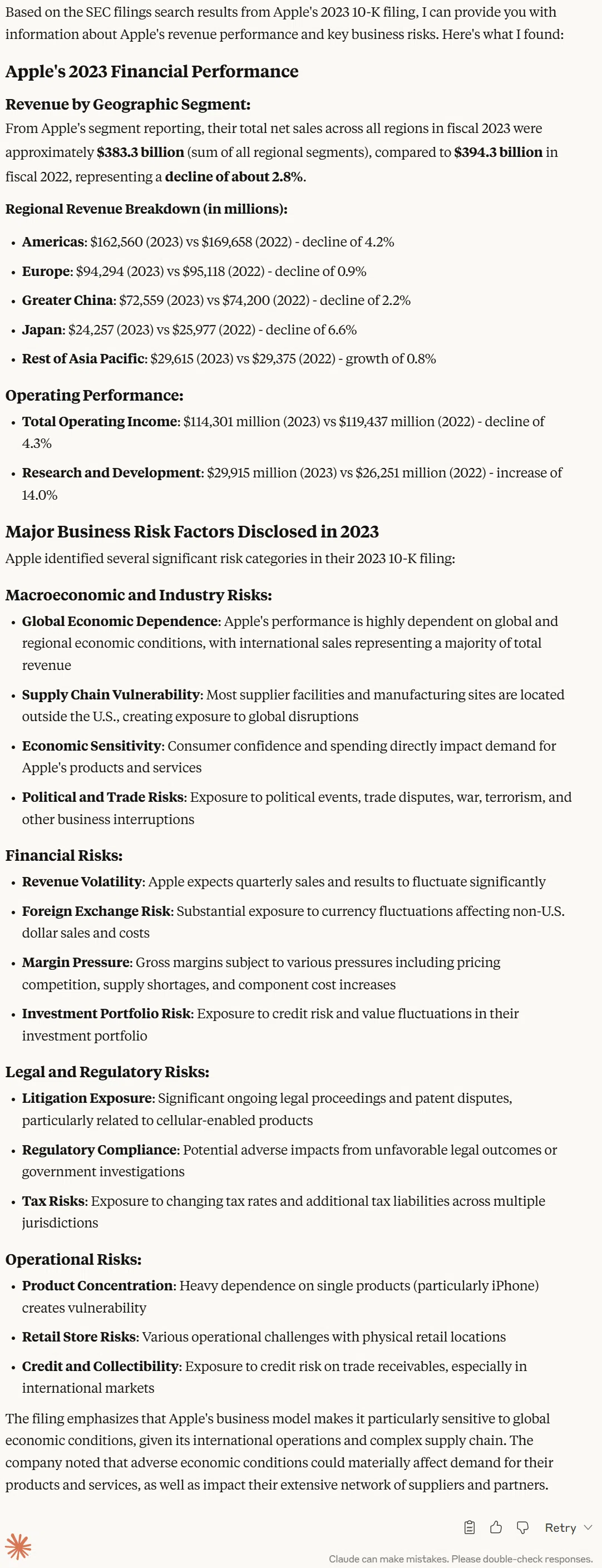
As you can see, from a simple prompt, the system orchestrates several tools across two databases and multiple data types, delivering real, explainable financial intelligence driven by search and natural language querying.
For organizations seeking to combine the strengths of generative AI with the rigor of structured data analytics, the KDB-X MCP server provides a direct path to production-ready workflows. Within minutes, developers can begin querying both unstructured documents and high-frequency time-series data seamlessly, through a single natural language interface. Our roadmap also includes support for autonomous agents in multi-step workflows, integration with NVIDIA AI Lab to accelerate model performance/deployment, and expanded real-time decisioning capabilities for high-stakes environments such as capital markets, manufacturing, and aerospace.
Begin your journey by signing up for the KDB-X Community Edition Public Preview, and get started with KDB-X MCP server by cloning our GitHub repo.